A month after the job, a customer finds your review card in a drawer. They were happy with the work. They scan the code with their phone, and it doesn't work. The review never gets written, and you never hear about it.
That can happen with a bought card. One owner on Google's help forum bought five of them. "They worked and now they don’t work," they wrote.
Why would a card stop? Some sellers' codes don't go straight to Google. They go to the seller's website first, and the seller sends your customer on. If you stop paying, or the seller closes, the card can stop working. It's the first thing I'd check.
You don't need a seller. Make your card from Google's own link and QR code, in about 20 minutes. Google gives both to your business, and they cost nothing. Then print the cards yourself. One printer lists 50 cards from $23. One seller wants $89.90 for ten, with a tap chip you don't need. So each card costs under 50 cents, against about $9.
By tonight, you'll have a card that works, and you'll have tested it. You'll also have the words for the back, and when to hand it over.
Who does what:
- The office, today: make the card, and test it.
- Whoever runs the walkthrough: ask for a review, and hand over the card.
- That same day: text the customer the link.
Already have cards? Scan one first. It takes a minute, and you'll know if yours can stop.
First, scan the review card you already have
Open your phone's camera and point it at the card's code. Don't tap yet. A line of text pops up: the web address the code will open. Read it.
Does it name the company you bought the cards from? Then your customers go through that company first.
Now tap it. Google's review box for your business should open. A customer picks the stars there, and writes.
Does the card also have a chip you tap your phone on? A chip can open the page without showing you the address first. So go by the code. Ask the seller where the chip points.
No cards yet? Skip ahead to copying your link.
If it named the seller, read the next part before you order more.
Why a review card that worked can stop
A card whose code goes through a seller is rented. One whose code holds Google's own link is yours.
Sellers call that kind of code "dynamic". One QR seller says its own dynamic codes stop working when your plan ends.
A Google forum volunteer, not a Google employee, says bought cards often work this way. The advice: have your own cards printed.
A warning like this was hard to find. I sorted the 35 results Google showed for four searches about the card and link. Of those, 19 offer a tool or sell a card. Only one was written for contractors, and it was about follow-up texts. Only one warns that a bought card can stop: the owner's thread on Google's forum.
The seller's pitch for a dynamic code: you can change where it points later. You'd make that change in the seller's account, so the card still depends on them.
Link-shortening websites work the same way. They turn Google's long link into a short one that runs through their site. Use Google's link as it is, long or not.
Already bought cards like that? Don't throw them out. Hand them out while they still open Google's review box. Scan one each week to check. Print your own before the seller's plan ends.
So start with the link you do own: Google's.
Copy your Google review link, and test it
Your review link comes from your Google listing, which Google calls your Business Profile. It takes four taps on your phone, then a test on a second phone.
Use the Google account that manages your listing. Not sure who has it? Ask whoever set the listing up, before you start. It may be the company that built your website. Ask them to add your account as an owner or manager. Google gives managers the same access as owners, except adding users or removing the listing.
In the Google Maps app, tap Business at the bottom right. Tap Read reviews, then Get more reviews, then Copy. Paste it into a note called Review link, and pin the note. I took these steps from Google's own help pages. If a button has moved, that page has Google's current steps.
Now test it the way a customer will. A customer's phone isn't signed in to your business. So text the link to a crew member's phone, or a family member's. Tap it. Google's review box should open, sometimes after a Google sign-in. Try an iPhone and an Android, if you can.
I test every link and code before I share or print it. None has ever sent a customer to the wrong place.
That sign-in is what your customer meets too. To leave a review, they must be signed in to a Google account. Any email address works, not only Gmail. Every review is public, under the reviewer's name. It can't be anonymous.
No listing yet, or never claimed it? Claim it first. Google needs it verified, and until then there's no review link. Some websites offer to build a review link for you. I'd skip them and use the one Google gives you.
The link goes in your texts. The card needs a code.
Make your Google review QR code from Google's own window
Google can also turn the link into a QR code. For now, it does that only on a computer. It sits in the same window as the link, and it costs nothing to make.
Search "my business" on Google, signed in to the account that manages your listing. Click Read reviews, then Get more reviews. Right-click the code, then Save image as.
Rather use a QR code website? These sites often offer two kinds of code. One QR seller says its "static" codes keep working even if you cancel. Its "dynamic" codes stop when your plan ends. So pick static, and paste in Google's link. Never use a link the site makes for you.
A code on its own asks nothing. The words around it do.
Write the card so it asks everyone
The card asks every customer the same way. No "if you were happy", no stars, and no words you want them to use.
At the walkthrough, whoever runs it asks like this:
You know what it's like to hire us. The next homeowner doesn't. Would you write us an honest Google review? I'll text you the link today.
The card says the same, so the customer reads what they just heard. Only the last line changes. A card found in a drawer next month would still say "today". Here are the words I'd print on the back:
[Business name] You know what it's like to hire us. The next homeowner doesn't. Would you write us an honest Google review? Scan the code whenever you have a minute.
"Honest" tells every customer, happy or not, that a mixed review is welcome.
Here's what I'd keep off the card:
| Don't print | The problem | Whose rule |
|---|---|---|
| "Happy with the job? Scan to review us." | It asks only the happy ones. | Google's, my reading |
| "Love our work? Scan!" | The same. | Google's, my reading |
| "Leave us 5 stars." | It steers the rating. | Google's |
| "Mention [crew name]!" | It asks for set words. | Google's |
| "Scan now, before we go." | It presses for a review at their home. | Google's, my reading |
"Google's" means its rules say it in so many words. "Google's, my reading" means Google bans the act. I read these words as doing it. Google bans asking only for positive reviews. Google has a rule against pressing for a review on your premises. Google doesn't say whether a customer's home counts. I treat it as if it does.
Ask an AI tool to write your card, and you may get one of these. I asked three about review cards and codes. Three of eight answers wrote a "happy" line. Two were for a card, one for a yard sign.
Words set, it's time to print.
Print your Google review cards
Any business card printer will do. The code and your business name go on the front. The card's words go on the back.
The $23 for 50 cards is MOO's price for its standard cards. The $89.90 for ten is a card seller's. Both were the prices on October 2, 2026.
A tap card has a chip a phone can read, as well as a code. You don't need one. If you buy one, send the seller your Google link for the chip and code. When it arrives, scan the code and read the address.
How big should the code be? I tested five sizes on my laptop screen, measured against a bank card. On a 2020 phone, ⅝ inch read at once, and ½ inch only up close.
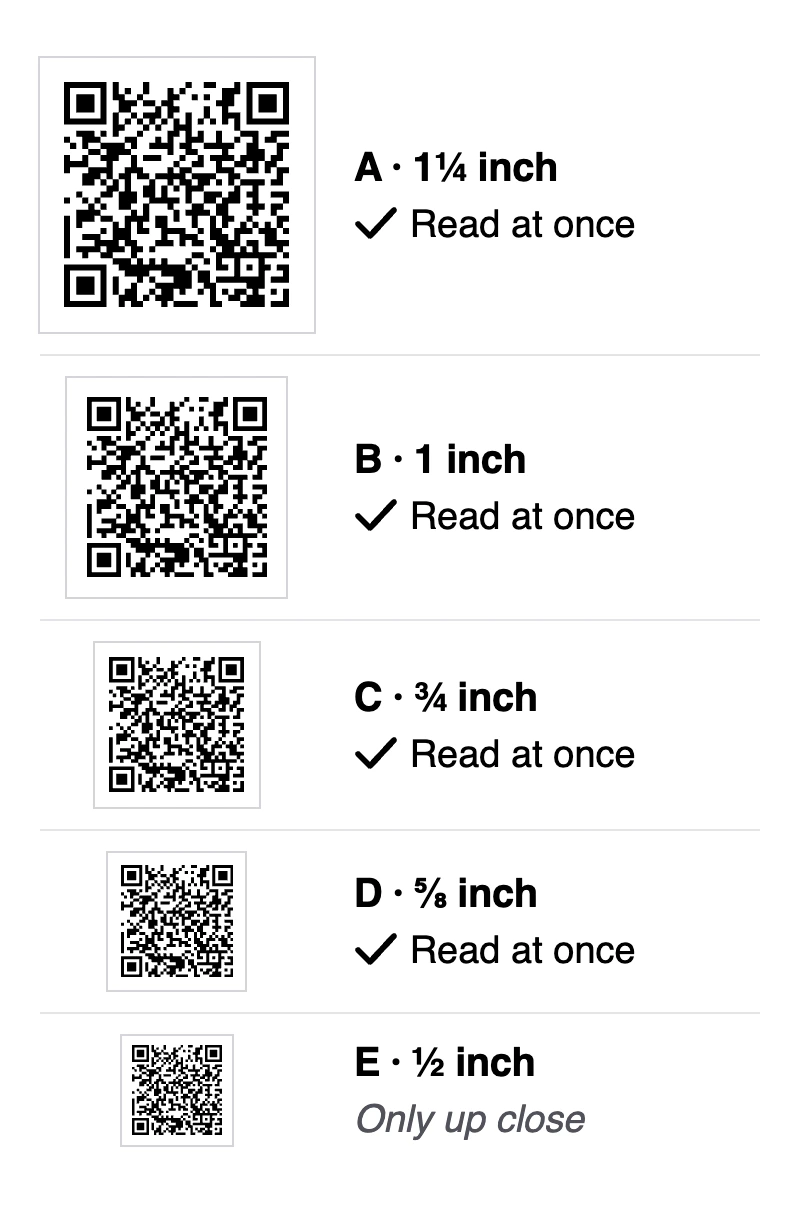
My test was on a screen, not a printed card. So print yours one size up, at least ¾ inch wide. Leave a white border around it.
Before you order, print one card on your office printer. Hold it in one hand and scan it, as a customer would. Then order the rest: one card per finished job, plus spares for each truck.
The card is printed. Now, how it leaves your hands.
Hand over the review card at the end of the walkthrough
Ask first, then hand over the card, at the end of the walkthrough. Whoever runs it asks: the lead, the project manager or you. Nobody waits for the scan.
The ask comes once the punch list is done, with the words above. Why they work is in my playbook on asking for Google reviews.
Then the card goes in with the close-out papers, beside the warranty. As you hand it over, say:
Here's our card for your papers. Whenever you have a minute, the code opens our Google review page.
Six of the eight AI answers hand it over at the end of the job. One says to do it "right when they are inspecting the brand-new roof." I wouldn't.
Google has a rule against pressing for a review on your premises. I treat a customer's home the same. With the crew standing there, a customer can feel pressed, even when nobody means it. So nobody waits while they scan.
I used to ask once and leave it there. Now the link always follows, the same day.
The text with the link still goes out that day. It comes from whoever ran the walkthrough, or from the office. Here's the text:
Hi [first name], it's [your name] from [business]. Thanks for trusting us with your [kitchen, roof, job]. Here's the Google review link, if you'd like to write one: [link]. It helps the next homeowner choose.
Been talking with this customer by email or WhatsApp all job? Send the same words there. A new channel, just for a review, feels like a stranger's message.
The card is a second way in, never the only one. Every customer gets one, happy or not.
I've given my clients both, the code and the link. More than half wrote a review without hesitation.
If your software already texts every customer the link, keep it. Set it to send that day, not with the invoice. It's the link the crew promised: one request, not two. Nobody else texts it.
First, read the address in its text, as you did with the card. If it isn't Google's, your customers go through the software first. Put Google's link in its place. Can't change when it sends, or what it sends? Turn its review text off, and send yours by hand.
Not sure it sends every customer to Google? Request one yourself and answer as an unhappy customer. No Google link means it filters. Turn the filter off.
Does the final check change hands at the walkthrough? Take the check first. Then ask, and keep money out of that conversation. The card goes with the warranty, not the receipt.
Customer not home? Leave the card with the close-out papers. Call that day. Ask by phone, then send the text.
Making the hand-over a habit the crew keeps is a playbook of its own.
The card covers the walkthrough. The link can go a few other places too.
Where else your Google review link goes, and where it doesn't
In the thank-you email, and on a page customers reach after the job. Not on the invoice, your email signature, the truck or a yard sign.
Google lists email as one way to send it. It also suggests thank-you emails. On your website, keep it to a page customers reach after the job. A thank-you page works.
The invoice? Google suggests putting the link on receipts. I keep it off, and that's my choice, not Google's rule. The invoice is about money. The review stays away from money.
I keep the code off the truck, the yard sign and the contact page. They ask strangers, and a stranger has no job to review. Keep the yard sign; just leave the code off it. Your email signature reaches suppliers and new leads too. Google wants reviews that come from a genuine experience. As I read it, that means customers. Let the truck carry your name and number instead.
A review stand is made for a shop counter, not a job site. I've seen owners buy a review stand and put it where anyone could scan it. Their reviews praised work they'd never done. New customers expected that work, and some were offended when the owner couldn't deliver it.
Now the whole setup, in one box.
The Move: make your review card today
Here's everything above in one box. Send it to the office as it is.
The Move
Today, a printed card whose code opens Google's review box. At your next walkthrough, it's handed over.
About 20 minutes today, by my estimate. Then a few days for the cards to arrive.
When: Today, before you order or hand out another card.
Today, the office
- Scan any review card you already have. Read the address before you tap.
- On your phone, in the Google Maps app, tap Business at the bottom right. Tap Read reviews, then Get more reviews, then Copy. Paste it into a note called Review link, and pin the note.
- Text the link to a phone that isn't signed in to your business. Tap it.
- On a computer, sign in to the account that manages your listing. Search "my business" on Google. Click Read reviews, then Get more reviews. Right-click the code, then Save image as.
- Put the code and your business name on one side of a card. Put the card's words on the other.
- Print one on your office printer, the code at least ¾ inch wide. Hold it in one hand and scan it. Then order the rest.
At every walkthrough, whoever runs it
- Say: "You know what it's like to hire us. The next homeowner doesn't. Would you write us an honest Google review? I'll text you the link today." Then hand over the card. Nobody waits for the scan.
That day, whoever ran it or the office
- Text: "Hi [first name], it's [your name] from [business]. Thanks for trusting us with your [kitchen, roof, job]. Here's the Google review link, if you'd like to write one: [link]. It helps the next homeowner choose."
The card's words
[Business name] You know what it's like to hire us. The next homeowner doesn't. Would you write us an honest Google review? Scan the code whenever you have a minute.
What you say as you hand it over
Here's our card for your papers. Whenever you have a minute, the code opens our Google review page.
The check
Today, scan your test card on a phone that isn't signed in to your business. When your cards arrive, scan one. That proves the printer's cards match your test. It passes when Google's review box opens both times.
If it doesn't work
It opens a seller's page. Make a new code from Get more reviews.
You don't have the listing's login. Ask whoever set the listing up to add your account as an owner or manager.
Get more reviews isn't there. Check that your listing is verified.
Your software already texts the link. Keep it. Set it to send that day, not with the invoice. Read its address first. Can't change it? Turn its text off, and text by hand. Request one yourself and answer as an unhappy customer. No Google link means it filters. Turn the filter off.
The customer isn't home. Leave the card with the close-out papers. Call that day. Ask by phone, then send the text.
The final check is paid at the walkthrough. Take the check first. Then ask, and keep money out of that conversation.
It asks you to sign in to Google. That's normal. The customer signs in, then writes.
A customer says the review didn't post. Wait a few days, then ask for a screenshot.
No walkthrough this week. Today's test card is enough for now.
The crew forgets the card. Put a stack in each truck's close-out folder.
You can't reach a computer. Send the text today, and make the code tomorrow.
When the card or the link doesn't work
If a customer says they left a review, and it isn't there
Google checks new reviews first, which can take a few days. So don't ask them to post it again. Say this instead:
Thank you for writing it. Google checks new reviews, and some take a few days. If it's not there by next week, could you send me a screenshot?
A screenshot shows you it was written. If it never appears, show it on Google's forum when you ask for help. Google gives several reasons a review may not show, and I won't guess which. Why reviews go missing is a subject of its own.
If the link asks them to sign in
That's normal. Leaving a Google review takes a Google account. If they don't have one, let it go, and don't point them anywhere else. On an older phone, Google suggests updating the Maps app.
If you can't find Get more reviews
Search "my business" on Google, signed in to the account that manages your listing. Tap Read reviews, then Get more reviews.
Still not there? Check that your listing is verified. In the Maps app, an unverified one shows "Verification required" and no review link.
If a card you bought stops working
Stop handing it out, and print your own. Ask the seller where its code points.
One last question: is any of this allowed?
Is it allowed to hand out Google review cards?
Yes. Google suggests printing its QR code and displaying it in a store. The limits are in how you use the card. Give one to every customer. Offer nothing for a review. Never press them on the spot. Those come from Google's review rules.
Can I put a QR code for reviews on my business card?
Yes. Google suggests printing its code and displaying it in a store. A card is my reading of the same idea.
Can I give something with the card?
No. Under Google's rules, a customer gets nothing for a review, whatever the rating. My playbook on paying for Google reviews covers what to stop.
Can the card ask for 5 stars?
No. Ask for an honest review instead. Asking for stars tries to steer the rating, which Google forbids.
Should I hand out a Yelp card too?
No. Yelp asks businesses not to ask anyone for a review.
Getting more reviews overall is a bigger question, with its own guide.
I read every rule here at its source, between September 26 and October 3, 2026. I didn't read any federal or state law for this page. This isn't legal advice.
What the card can lead to
You can test the card on your own phone, so you know it works. Whether a customer writes is theirs to choose, and I can't promise they will. The card's job is to work on the day they're ready.
A month from now, a customer finds your card in a drawer. They scan it, and Google's review box opens, with nobody in between.
When your cards arrive, scan one. Tell me in the box below what opened. Did a bought card run through a seller? Tell me that too. I read every reply.