Think of your last five finished jobs. How many of those customers wrote you a Google review?
If it's one or none, your newest review is months old. The homeowner comparing you with two other firms sees that date before they call.
Why so few? One plumbing owner had the same problem: "We've always had good reviews, but they're far and few between." Their fix was to ask at the end of every call. I'd do the same.
Do you ask only when you remember, or when a customer seems happy? Then some customers never hear it. And asking only the happy ones breaks Google's review rules. Google forbids businesses to "selectively solicit positive reviews."
You get more Google reviews by asking every customer, in the same few words, at the end of every job. At the final walkthrough, ask how the job went. Then say this:
You know what it's like to hire us. The next homeowner doesn't. Would you write us an honest Google review? I'll text you the link today.
Text the link that day. It comes from Google itself. The box below shows where to copy it.
There's nothing to buy to start. It takes about half an hour today, then two minutes at each walkthrough. By tonight, you'll have the words, a review link you've tested, and a list of customers nobody asked.
Here for the steps only? They're in the box near the end. First, why it's worth two minutes a job.
Are Google reviews worth it next to ads and leads?
Yes, ads or not. Whether a homeowner comes from an ad, a lead or a friend, they look you up before calling.
One remodeler asked it outright: "does it really even matter compared to just paying for ads or leads?"
I call it the look-up. It's what a homeowner finds before calling: the reviews, the Google listing, and the two or three rivals showing up alongside. Your newest review's date is part of it.
What about leads in general? One lead agency counted 469 of its own home-service clients. Those with more than 10 Google reviews had a median of 4.5 of what it calls organic leads a month. Those with fewer had 2.
It never says what counts as organic. It calls its finding a correlation, not proof. I'd call it the same: a hint, from a firm that sells leads.
"If you do a good job, your work will speak for itself," another plumbing owner said. It does, to the customer who saw it. The next homeowner didn't.
Run Google's own ads, or been pitched them? Google calls them Local Services Ads, a different product from its search ads.
Google says it plainly: "Star ratings and number of reviews affect how your business is ranked within Local Services Ads."
Depending on your business type, you may need 5 reviews to show. And ads Google rates higher, reviews included, "may also pay lower costs per lead".
Those reviews are your listing's reviews. As I read those Google pages, the ad is judged partly on the same ones.
Whether those ads pay for your trade is a question of its own. Either way, the reviews they show come from your asking.
So the reviews matter. Here's how to see where yours stand.
Where you stand today, and which playbook to open first
Open the Google Maps app and search your business name. That's your listing, which Google calls your Business Profile. Tap Reviews, then Newest. The top review is the last time any customer wrote about you.
Write down how old it is, then count the reviews from the last 90 days. The app shows each review's age, like "5 days ago" or "3 months ago". Count every review until the first that says "3 months ago".
Now count one more thing. How many jobs have you finished since that top review?
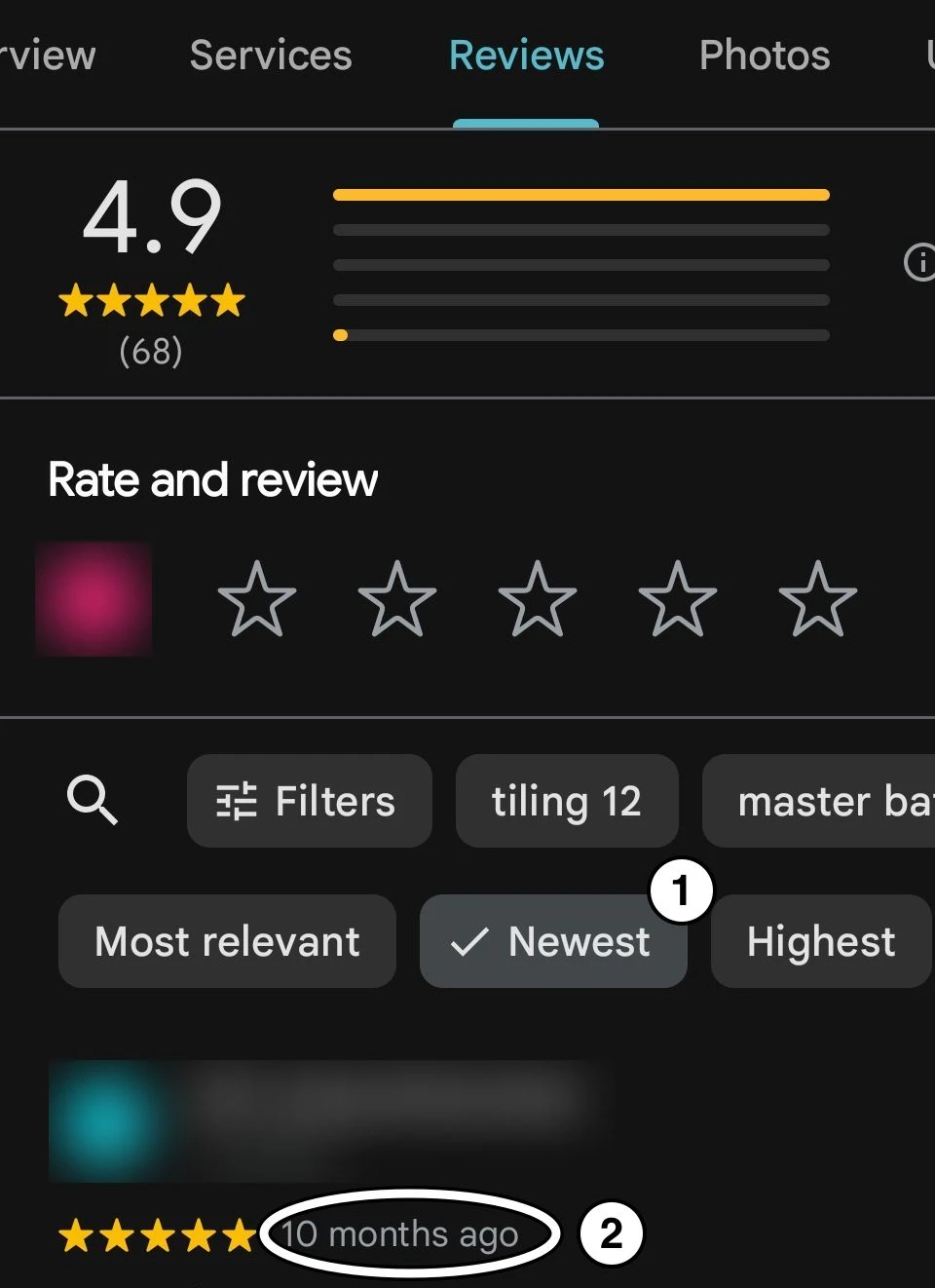
Say it's five months old, with none in 90 days, and 12 jobs since. Those are quiet months.
Quiet months are months with finished jobs and no new Google review. One is normal for a trade with long jobs.
Five in a row means five months of finished jobs that nobody wrote about. That's the date the homeowner sees.
Now match what you found to the playbook that fixes it. Which one to open first is my reading of what each finding means.
| What you find | Open first |
|---|---|
| A gift card, a bonus or "5 stars" tied to a review | Paying for Google reviews, today |
| Family or staff writing your reviews | Paying for Google reviews |
| Only happy customers get asked, by you or by software | Paying for Google reviews |
| Customers from finished jobs were never asked | Asking for Google reviews |
| No saved review link, or a card you bought | The review link and card |
| Crews run walkthroughs without you | Getting your crew to ask |
| Every customer asked, and you want to know if it's enough | How many reviews you need |
Check the first row before the others. A reward tied to a review is the one thing to stop today.
Twelve jobs and no new review? Then start with the ask.
Ask every customer at the final walkthrough
At the final walkthrough, ask how the job went. Then ask every customer the same way, for an honest review.
The customer's punch list is the second list at the final walkthrough. After the punch list for the work, you ask the customer for theirs. How did the job start? Did the crew come on time? Did they clean up?
Anything on it gets fixed like any punch-list item. The fix never depends on the review. The review request is its last line. Every customer gets it, whatever is on their list.
The four questions to ask are in the box below. Then you say this:
You know what it's like to hire us. The next homeowner doesn't. Would you write us an honest Google review? I'll text you the link today.
Asking there is allowed. "I'll text you the link" means nobody has to write anything on the spot. Google has a rule against pressing for a review on your premises. I treat a customer's home the same.
Text the link that day. If nothing comes, send one reminder, three to seven days after the first text. Then stop. The words are in the box below.
And the customers from those quiet months? The customers nobody asked can still hear the question. Go back 60 days and call each one. Ask the same questions, then the same line, and text the link.
Sixty days is my line: recent enough that the job is fresh for them. You or the office can make the calls.
A customer with an open item gets the same call. The fix gets its day, and the ask doesn't wait for it.
Why they work is in my playbook on asking for Google reviews.
But what if you're just starting, with almost no reviews?
Starting with almost no reviews, or never asked
Ask every customer. Start with jobs you've already finished: the same calls, the same questions, the same line. Fewer than 60 days of jobs? Call every customer you've had.
Never asked anyone? After the last 60 days, call older customers too, newest first, the same way.
In early 2025, a remodeling owner asked customers for reviews, and got the first three. About three weeks later, a client told the front desk that ChatGPT had named the business the best in the area.
That was one case. I'd put it down to the area: rival firms there didn't take their Google listings seriously.
Three weeks can happen when the asking gets done, but it's no promise. And I can't say the reviews made ChatGPT name the business. Nobody can see why an AI names a business.
So what do a few reviews do? A tool I built searched roofing, kitchen and bath, plumbing and garage doors. It searched two US cities, from about 80 places in each, as a customer would.
Each search shows three firms at the top of the map. Firms with fewer than 10 reviews still held 7% to 23% of those spots, mostly near their own address.
Firms with more reviews showed up near home too. That's distance at work, which Google says counts.
So a firm with few reviews still shows up near its own address, like the rest. What the first reviews change is whether the homeowner who finds you calls. That last part is my reading.
Ask customers only. A friend who hired you is a customer, so ask them like anyone else. But keep family and staff off your Google reviews. Google counts family, and current or former staff, as a possible conflict of interest.
Family is one shortcut to skip. Here are the ones Google forbids outright.
What you may never do, and what's allowed
Asking is allowed. Google's own help page tells businesses they can ask.
Never buy reviews, reward them, or ask only the happy customers. Ask for an honest review, never for 5 stars. Google's review rules set the limits:
| Don't | Whose rule |
|---|---|
| Offer a customer anything for a review, any rating | Google's |
| Ask for 5 stars, or for set words | Google's |
| Ask only the customers you think are happy | Google's |
| Have family or staff write one | Google's, my reading |
| Buy reviews, or pay someone who supplies them | Google's |
| Set the crew a number of reviews to hit | Google's |
| Ask the crew to collect reviews that name them | Google's |
| Press for a review on the spot, at their home | Google's, my reading |
Asking at the walkthrough is fine. Pressing is "Here, you can do it on my phone now." Where a row says "my reading", Google's words leave room, and that's how I read them.
That third row matters, because the advice at the top of this search says the opposite. On October 6, 2026, Google's own AI summary for this search opened on one line. It says to "directly ask satisfied customers".
As I read it, that's asking only the happy ones, and Google's rules forbid it. Three of the seven AI answers I asked steered the same way. If an AI tool told you the same, that's why.
Google files that under rating manipulation. Biased reviews, it says, "will be removed from Maps".
Found a reward already promised? Stop it today. Leave the old reviews alone. A customer asks about the old gift card? Say you've stopped offering it. They're still welcome to write one.
Is it legal to buy Google reviews?
Google's rules forbid it, and Google decides what stays on your listing. What does the law add? My playbook on paying for Google reviews sets it out.
Can Google detect fake reviews?
Google says it uses machine learning, with trained people for the harder calls. It doesn't catch everything.
I read every rule here at its source, between September 26 and October 7, 2026. I didn't read any federal or state law for this page. This isn't legal advice.
Inside those lines, the ask needs one thing: a link that opens Google's review box.
Your Google review link and card, from Google itself
In the Google Maps app, tap Business at the bottom right. Tap Read reviews, then Get more reviews, then Copy.
Use the Google account that manages your listing. Not sure who has it? Ask whoever set the listing up, before you start. It may be the company that built your website.
Now test it the way a customer will. A customer's phone isn't signed in to your business. So text the link to a crew member's phone, or a family member's. Tap it.
Want a card too? Make your card from Google's own link and QR code. Then print the cards yourself. So each card costs under 50 cents. A seller's card with a tap chip runs about $9.
My playbook on the card covers making one.
With the link saved, the ask works at every walkthrough you run. But you may not run them all.
When the crew runs the walkthrough
Not at every walkthrough yourself? Then the close-out sheet carries the ask.
Your crew's close-out sheet is a checklist: the work, the papers and the final payment. Add to the close-out sheet: "Customer's punch list done, ending with the ask." The customer initials it.
Every Monday, you count the sheets. Count the sheets, never the reviews. The sheet is the part the crew controls.
The lead asks at the walkthrough. The office texts the link that day. Paper or job software both work. About ten minutes a week, by my estimate, and nothing to buy.
Ask the office before you start. Their new work is a text per job and one reminder.
Never set them a number of reviews to hit. Never ask them to collect reviews that name them. Google's rules forbid both.
A customer who names your crew on their own is fine. The rule is about asking the crew to collect them. My reading: a target pushes the crew toward the happy customers.
Getting your crew to ask on every job has its own playbook. Say a lead calls it begging. The questions are about your work. The review is just the last line.
A lead forgot? Then the office calls them today, and the sheet waits.
Once every customer is asked, the next question is how many will write.
How many customers will write a review?
Nobody knows that for a contractor, and I won't pretend to. So count the asking, which you control.
The rates AI tools give come from software sellers' and agencies' blogs. Google tells businesses running Local Services Ads: "Customers are more likely to leave a review if the request comes from you directly."
I ask my own clients for reviews too, with Google's QR code and the link. More than half wrote a review without hesitation. That's my clients, not a number to expect.
Of the customers you call this week, some will write and some won't. I can promise you the asking. I can't promise the reviews.
So when will any of this show on your listing?
What you'll see, and when
The number of customers you've asked moves today. Your 90-day count follows, as customers write. Give it 90 to 120 days before you judge your pace.
Then find the rivals above you on Maps. Skip any marked "Sponsored": those firms paid to be there. Count each rival's reviews from the last 90 days the same way. If theirs is higher than yours, the gap is growing.
Nobody can promise you a place on the map. Google adds that nobody can buy one.
How many Google reviews is good?
There's no one number. What counts is your pace against the rivals above you. My playbook on how many reviews you need works it out, rating included.
How do you get to 1,000 reviews?
By asking every customer, job after job. Your pace has a ceiling, though: the jobs you finish, because each one is one customer who could write. Anything faster means reviews from people who never hired you. Google's rules remove those.
Asking every customer by hand means someone has to remember. Should software do it?
Do you need review software?
To start, no. First, set your ask: the moment, the words, and who says them.
Once it's set, software can do the part people forget: the text and the reminder. Nobody has to remember, and no customer slips through. Whoever was texting each one by hand gets that time back, on every job.
One owner does both: asks in person, then lets software send the invite.
Software can ask how the job went, by text or email. It can't walk the job with them, and fix what's left before the crew leaves. That stays with you or your lead.
It helps most once your ask is set. With a crew, the sign is close-out sheets coming back with the customer's initials. Run every walkthrough yourself? The sign is every finished job asked.
Bought before the ask is set, a tool can't tell you whether it's working. Its dashboard counts texts sent, not whether anyone asked at the walkthrough.
The review software I priced on October 6 and 7, 2026, listed $75 to $599 a month. Some add a fee per location.
The price isn't what decides it. Your ask is.
Most tools let you choose when they send, and how many reminders. Some owners send more than one.
I'd set it the way you'd ask by hand. The link goes out the day the job is done. One reminder follows, three to seven days later. Then it stops.
Google's rules set no number of reminders. Past one, it starts to feel like pressure.
Before you buy, check that you can set it that way. Then check one more thing.
Some tools ask for a rating first, and send only the happy customers to Google. That filter asks only the happy ones, which Google's rules forbid.
So request one yourself and answer as an unhappy customer. No Google link means it filters. Turn the filter off.
Where nobody asked at the walkthrough, asking how it went by text first is fine. Keep each text short, one ask each: the question, then the link later that day.
The link goes out whatever they answer, or if they don't answer at all. Test that too: request another, and don't reply. Anyone who says something went wrong gets your call that day.
Already paying for one? Keep it, and set it the same way: that day, not with the invoice. The crew promised the link that day. Then run the same test.
So when a rep calls, you'll know what software would do. And what stays with you. Here's the whole start, in one box.
The Move: start asking every customer this week
Send it to the office as it is, or keep it on your phone.
The Move
By tonight, you know where you stand, and no reward depends on a review. In seven days, the last 60 days' customers are asked.
About 30 minutes today, by my estimate, more if you find a reward to stop. Then a call to each customer nobody asked, and about two minutes at each walkthrough.
When: Today, before the next job closes.
Today
- Open the Google Maps app and search your business name. Tap Reviews, then Newest.
- Write down two numbers. How old is your newest review? How many came in 90 days? Count until the first "3 months ago".
- Look for any gift card, bonus or "5 stars" tied to a review. Stop it today.
- Copy your review link. In the Google Maps app, tap Business at the bottom right. Tap Read reviews, then Get more reviews, then Copy.
- Text the link to a phone that isn't signed in to your business. Tap it. Google's review box should open.
- List every customer from jobs finished in the last 60 days. Call each one nobody asked: the questions below, then the line, then the link. Mark each one asked.
At every final walkthrough
- Ask the four questions below. Put anything they name on the list, with a day to fix it.
- Then say the line, and text the link that day.
The questions (on a call, leave out "Before we go". "Our list" means anything still to fix.)
"Before we go, how did the job go for you? Did the crew show up when we said? Did we leave the place clean each day? Anything you'd want on our list?"
The line
"You know what it's like to hire us. The next homeowner doesn't. Would you write us an honest Google review? I'll text you the link today."
The text, the same day
"Hi [first name], it's [your name] from [business]. Thanks for trusting us with your [kitchen, roof, job]. Here's the Google review link, if you'd like to write one: [link]. It helps the next homeowner choose."
Software already texts every customer the link? Keep it, and nobody sends a second one.
The one reminder, three to seven days later
"Hi [first name], [your name] again from [business]. In case the link got buried, here it is: [link]. That's my last note about it. No worries if you'd rather not."
Then stop.
If a crew runs the walkthrough
- Add to the close-out sheet: "Customer's punch list done, ending with the ask."
- The customer initials it. Every Monday, count the sheets against last week's finished jobs.
Every 30 days
- Read your two numbers again. To count your rivals too, open my playbook on how many reviews you need.
The check
In seven days, every name on your step 6 list should be marked asked. That's the test.
Read your two numbers too, today and in seven days. They can lag: Google checks new reviews first.
If it doesn't work
The crew forgot. Make the customer's punch list the last line of the close-out sheet. Never put it on the customer's sign-off form, the one they sign for the job. My playbook on asking says why.
They said yes, and nothing showed up. Google checks new reviews first, which can take a few days. Send the one reminder.
You can't find Get more reviews. Search "my business" on Google, signed in to the account that manages your listing. Tap Read reviews, then Get more reviews.
You're not sure about a reward. If it changes with a review, a rating or a name, stop the reward.
No job finished this week. The calls in step 6 are this week's result. The walkthrough ask starts on the last day of your next job.
When it doesn't go to plan
If you run every walkthrough yourself
Then the crew habit isn't your problem yet. My playbook on asking is the one for you.
If it's a service call, not a project
The end of the call is the same moment. Ask the same questions there, then ask for the review.
If a customer doesn't use Google
Leaving a Google review takes a Google account. If they don't have one, let it go, and don't point them anywhere else.
If they'd rather have email
Send the same words by email, from your business address.
If the customer isn't home when you finish
Call that day. Ask by phone, then send the text. Note the call on the sheet.
If the final payment changes hands at the walkthrough
Take the check first. Then ask, and keep money out of that conversation. Still owed money, by the customer or their insurer? Ask anyway.
If a review comes back bad
Sooner or later, one will, and it will sting. Google takes a review down only if it breaks Google's rules, like spam. One you just disagree with stays up.
Check it against your job records first. Reply calmly, and fix what you can. Replying to it is a guide of its own.
One bad review among honest ones isn't the end. Google says it itself: "A mix of positive and negative feedback often feels more trustworthy."
If your reviews disappear
Reviews can disappear for many reasons. A drop alone doesn't prove Google caught anything. Keep asking every customer.
If reviews come in a burst after years of nothing
I found no Google rule about how fast reviews come. Its rules are about how you ask. A burst shows you can collect reviews when you ask. Keep asking, so it doesn't stop again.
Should I ask for Yelp reviews too?
No. Yelp asks businesses not to ask anyone for a review.
What asking every customer can lead to
Asking every customer is the part you control. How many write is theirs to choose, and I can't promise a number. Each one that comes changes the date a homeowner sees before they call.
Five jobs from now, count them again: how many were asked, and how many wrote. Make the first number five.
In seven days, tell me in the box below which playbook you opened first. How many did you call? I read every reply.